
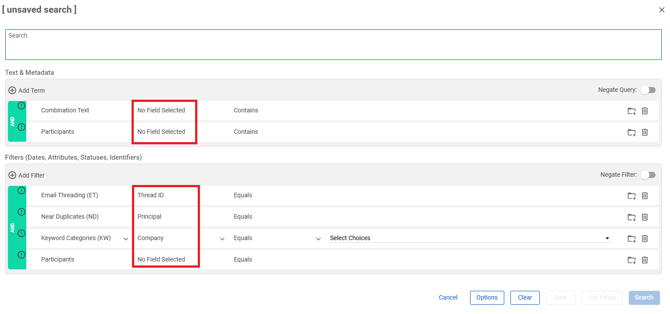
Text & Meta Data grouping fields
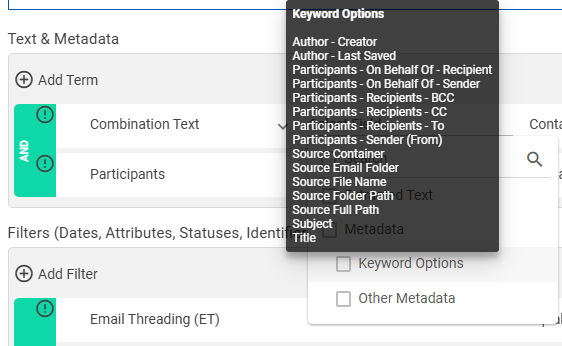
- Combination Text: Select the Extracted Text and Metadata (Keyword Options, Other Metadata) you want included in the search. Tool tips display the fields included as Keyword Options (defined on the Keywords page)...
... and Other Metadata.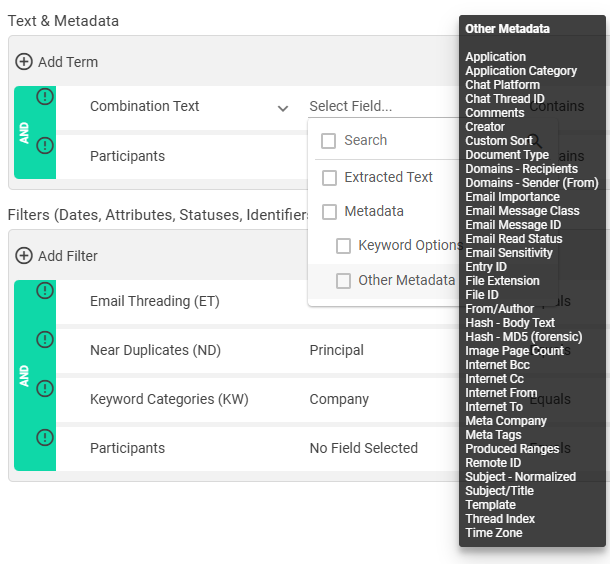
Note:Metadata - Keyword OptionsandMetadata - All Searchableare also available as individual search terms. - Participants: Select the correspondents you want included in the search from the following:
- Sender (From)
- Recipents (To, CC, BCC)
- On Behalf of (Sender, Recipient)
Filters (Date, Attributes, Statuses, Identifiers
- Email Threading (ET): Select the email threading criteria you want to used to filter the search from the following:
- Thread ID
- Node ID
- Node Path
- Node Level
- Designation
- Email Action
- Keyword Categories (KW): Select the keyword categories and corresponding keywords you want used the filter the search.
- Near Duplicates (ND): Select the type of near duplicates you want used the filter the search from the following:
- Principal
- Similarity
- Group ID
- Duplicate
- Participants: Select the correspondents you want used the filter the search from the following:
- Sender (From)
- Recipents (To, CC, BCC)
- On Behalf of (Sender, Recipient)