
From here, users can:
- Open the Document Viewer.
- Perform many common database functions "en masse."

- Document List menu:
 Refresh: Update the contents of the displayed Document List.
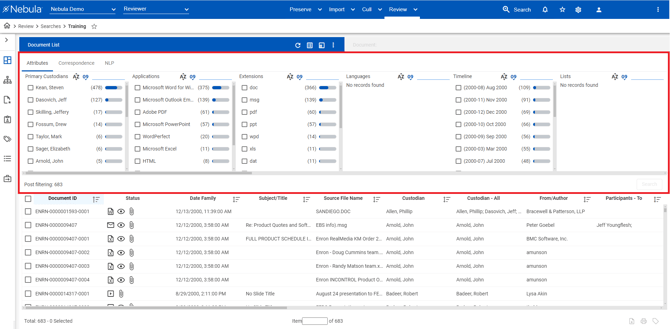
 Show/Hide Facet Explorer: Display current attributes of the document set. Attributes can be cleared and selected to filter document sets.
Note: The Show/Hide Facet Explorer icon is only available for DIRECT searches. Create sample: Create a smaller subset of documents in the Document List.
 Actions: Perform mass actions on the Document List, including exporting metadata and running various reports.
- Document List: Displays select metadata fields for each record on the list.
Note: By default, the Document List is sorted by Document ID. - Document Totals: Displays the total number of documents in the Document List, as well as the number of the document currently selected.
- Command Buttons: Enable you to perform the following tasks to documents selected on the Document List:
 Download natives: Prepares a zip file of the files selected in the Document List.
 Print selected documents: Converts documents to PDF for direct printing or saving.
 Mass Tag: Associates or unassociates attributes with selected documents.
 Refresh: Update the contents of the displayed Document List.


To open a document in the Document List in the Document Viewer
Method One
- Locate the document in the Document List and double-click its row.

Method Two
- Locate and select the document in Document List, then click the Document Id in the menu bar.
